
Thursday, December 01, 2011
Process Explorer

Tuesday, April 12, 2011
Universal Extractor

There are many filetypes we deal with in Windows that are compressed archives, but may not have an extension that tells Windows this. A good example would be an Android .app file. Installers are also usually just archives with some sort of script attached telling the un-archiver where to put everything. Universal Extractor, from Legroom.net is the best way to deal with these files.
You can use Universal Extractor as a full Windows application, integrated into the shell, or as a simple drag and drop app. If you choose the latter, there are also portable versions of UE out there if you want to load it up with your USB tools, or add it to a custom PE disk. A full install gives right-click options on almost any file.
I first discovered UE when I read an article somewhere on making your own portable apps. This works because UE will unpack many common installers. After unpacking, just put all of the binaries and support DLL's, etc in one directory and try to run. This method does not always work, but for many applications it does.
As a day-to-day extractor UE works fine, but I think it is a bit slow for me. Usually for routine extracting I prefer 7zip.
Thursday, April 07, 2011
BBSAK (Blackberry Swiss Army Knife)

If you have ever had to deal with a corrupted Blackberry, you know how frustrating it can be to completely wipe a locked, or non-functioning berry. This application, Blackberry Swiss Army Knife can do things not available in the regular desktop software. BBSAK is a replacement for JL Cmdr, and is a front end for RIM's java loader command line tool, as was JL Cmdr.
BBSAK offers backup and restore options, 3rd party app backup, OS loading, factory reset, complete device wipe (leaving you at the 'error 507' screen) for replacing a corrupted OS, read the device logs, create and restore JAD files from CODs, and many more advanced features. Get it here.
Wednesday, April 06, 2011
Hiren's Boot CD

I know what some of you who may know about Hiren's already are thinking. Hiren's is free but contains software of questionable origin. This is no longer the case folks! For those of you that do not know about Hiren's Boot Cd already, Hiren's is a collection of over 300 programs and utilities bundled into a bootable CD image. You can boot into a DOS environment for low-level utilities like HDAT2 (a great hard drive recovery utility like SpinRite, or HDDRegenerator), or boot into a Windows environment with a large collection of tools and utilities. Hiren's used to come with pirated versions of Ghost, HDDRegenerator, Acronis, and others. The newer versions contain all free software. I would guess the Windows section is in a gray-license area, but I'll leave that moral dilemma up to you. The .iso file is available from several sources. Just search for "Hirens Boot CD .iso" in your favorite search engine. There are also directions on the Hiren's web site for making a bootable USB stick out of the .iso file. Hiren's CD Homepage
Tuesday, April 05, 2011
Unlocker

How many times have you attempted to delete or edit a file in Windows only to be told that it was in use? Or tried to safely eject a drive and refused because something is accessing the drive in question? Unlocker is the answer. A simple application that runs in the system tray, and pops up when it senses an "in-use" dialog. For locked drives, you can right-click the drive in question and get a list of programs that are currently accessing it. You are then given options to unlock the object, or kill the process that is locking it. Unlocker is free to use. The developer asks that if you appreciate his work, you may donate towards its future development. Download here.
Monday, April 21, 2008
VLC Media Player

"Hey, I can't open this video file in Windows Media Player" VLC Media Player! "I get a message that I don't have a DVD decoder installed when I try to play a movie" VLC Media Player! "I'm tired of having 5 media players on my computer" VLC Media Player! "I want a media player that runs on all of my systems, MAC, Windows, and Linux" VLC Media Player!
I can't say enough about this program. It plays almost everything you throw at it, and has network-streaming features, remote interface capability. There are installs available for Windows, MAC OS X, Linux, BeOS, and the code can be compiled to run on BSD, Solaris, and QNX. You can find it here.
Monday, February 04, 2008
WinDirStat

This is one of those programs that I take for granted these days, so I didn't think about posting it here until now, but it is one of the most useful freeware programs I have ever found. WinDirStat analyzes your hard drive, and displays both graphically and numerically where your largest files and directories are. I just used it on a laptop at work and found a 15 Gigabyte temp file that needed to be deleted! You can remove files right from the GUI and then refresh the display to reflect the removal. It runs well as a portable too, so I keep a copy on my USB drive. Try it here.
Friday, February 01, 2008
MultiMon Taskbar

This little freeware program, also known as Oscar's Multi-Monitor Taskbar, seems to be the only alternative to the commercial UltraMon. Though it doesn't have as many features as UltraMon, it gets the job done. supporting two to three monitors. It adds a small arrow along with the standard controls in windows and programs that quick-switches the window to the other monitor. Programs appear on the taskbar for the screen they're running on, and there's even a little clipboard history utility on the extra taskbar as a bonus. I use it on my laptop, and when starting away from my docking station, I get a quick message on the screen that I currently do not have multiple monitors, and it quietly exits. You can find it here, along with detailed instructions. While you're there check out Oscar's other free tools.
Wednesday, January 30, 2008
Universal Extractor

I became aware of Universal Extractor when I started trying to make ordinary programs work as portable apps. Now, there's a lot more to making an app portable than extracting the install files into one location, but I'll save that for another post. Basically, Universal Extractor will extract almost any kind of archive, which includes many install and setup exe's. Simply right-click on any file and choose uniextract and the program will attempt to extract the file. Very handy for those driver installs we techs all curse, when we simply want the basic driver files! Get it here: http://legroom.net/software/uniextract
Monday, January 28, 2008
Drive Image XML (DiX)

Drive image XML is an excellent alternative to Ghost or other drive cloning and backup software. It copies drive-to-drive, backs up partitions and drives, restores them to the same or different partition or drives, and allows you to browse the backups. The big advantage is that DiX does all of this live, while Windows is running, by using Microsoft's Volume Shadow Services (VSS), allowing you to create safe "hot images" even from drives currently in use.
DriveImage XML runs under Windows XP, Windows Server 2003 and Windows Vista only. The program will backup, image and restore drives formatted with FAT 12, 16, 32 and NTFS.
I was able to make a portable version of it to carry on my USB drive, and they mention on the website that it is installable on a bootable PE disk.
Get it HERE
Thursday, January 24, 2008
authorPOINT Lite

I was trying to use the feature in Power Point the other day which turns a PP presentation into a web presentation. This worked, but the resulting folder was huge, and I was unable to embed any other media in the presentation afterwards. I then tried Open Office Present because it has a Flash export feature. I got a Flash slideshow, and could use other Flash objects on the same page, but it was click-to-advance only!
This program, authorPOINT Lite, takes the presentation and turns it into a nice Flash package, with a navigation tree and other tools. They also offer a free hosting service for your finished Flash presentation. Download Here
Friday, March 02, 2007
Screamer Radio

I have been a Shortwave listener for years. I was given a radio by a friend of my parents that received shortwave when I was about 7 years old. I have owned many since then, becoming a collector.
The hobby has been slowly dying out in the modern age. Modern technology has caused many of the shortwave broadcasters to reduce or even eliminate their world services, and the utility stations (government and commercial) have been replaced by Internet and digital satellite based services. I kept a few radios though ,and still turned them on and listened once in awhile. Until I found this program that is.
Net radio is fun. You can find many of the world-wide outlets that are gone from shortwave on the net. The problem has been formats, and directories. Too many different places to look and you need three or four players to listen. Some of the stations even force you to listen with a browser-based player only.
Screamer Radio is a nice little program that plays almost any streaming format internally, and has a nice self-updating directory with over 5000 entries! The directory and favorites list are in XML format, allowing customization. You can add custom stations easily. There is also a record function that works very well, and support for Winamp plug ins in the newest beta version.
As a small aside, there is a video equivalent of screamer that I have found. Not as polished, but also very interesting. It's called JLC's Internet TV. Same idea applied to Internet TV.

Download Screamer Radio Here
Download JLC's Internet TV Here
Tuesday, October 31, 2006
PStart, and Portable Applications
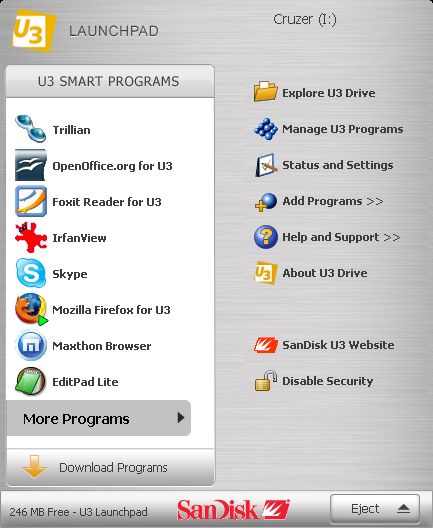
I recently acquired a Sandisk Cruzer Micro 1GB. It came with the U3 system installed on it. I have been using it every day now. I run Firefox, Skype, and several other apps port ably. I can't say enough about how convenient this is, even with some of the small shortcomings, but what to do if you have a non-U3 compatible USB stick?
There is a handy website, portableapps.com, that hosts portable applications and even a whole portable suite. They are also the default home for a few of the U3 apps. This turns any USB key into a portable app host. If you want the start-menu style functionality then I recommend an application called PStart. Pstart is available for free and gives a non-U3 USB stick U3-like functionality, except that it won't auto run.
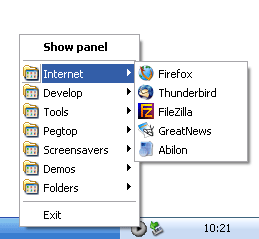
When I was looking at PStart I noticed that they have a U3 version. This solves an issue that I had wondered about. How to make a non-U3 portable application easily accessible on my U3 drive. I have PStart installed and set to auto run when the U3 drive is inserted. I get a second icon in the system tray next to the U3 one, that can be used to launch other non-U3 applications I run. Very handy!
I have put Miranda on it, and now use it as my default messenger. (update: I have since switched to Pidgin Portable)
Wednesday, October 25, 2006
KillDisk
I found this program when I was having an issue with a USB pen drive. I had installed the USB version of Damn Small Linux, DSL creates a 50 meg partition to install to, and leaves the remaining portion of the drive useless, and when you want to un-install Linux, the entire drive is useless. I couldn't get any of the normal Windows tools or partitioning utilities to remedy the situation either.
This program is actually meant as a drive eraser. It writes zeroes to the entire drive. The beauty of it is that it sees USB drives as regular hard drives and allows you to kill the ENTIRE drive not just the partitions on it. It works on all sorts of flash media and seems to be useful in recovery from all kinds of corruption. I have yet to use it for its intended purpose yet, but I'm sure it does that well also. A registered version gives you more erasing options.
The executable you want to run is: KD_WIN.EXE. It looks like a DOS program but is Win32. Make sure you know what you are erasing when you run this because it is VERY effective! Remember, this program is for when all else has failed and you simply want the drive back, it will ERASE EVERYTHING!
Download it here
This program is actually meant as a drive eraser. It writes zeroes to the entire drive. The beauty of it is that it sees USB drives as regular hard drives and allows you to kill the ENTIRE drive not just the partitions on it. It works on all sorts of flash media and seems to be useful in recovery from all kinds of corruption. I have yet to use it for its intended purpose yet, but I'm sure it does that well also. A registered version gives you more erasing options.
The executable you want to run is: KD_WIN.EXE. It looks like a DOS program but is Win32. Make sure you know what you are erasing when you run this because it is VERY effective! Remember, this program is for when all else has failed and you simply want the drive back, it will ERASE EVERYTHING!
Download it here
Monday, October 23, 2006
And, After a Long Absence.... Hamachi, and Avvenu
 I know... I started this page, and then...NOTHING!! I apologize to any and all of you that might have landed here expecting to read something interesting. I intend to make this a regular task now, so here we go:
The company I work for in Manhattan has 12 offices around the country. We connect them using hardware-based VPN's. We also have a few outside employees using IPSEC VPN client software provided by our VPN firewall vendor. The software doesnt always work the way you want it to though, and is more than some people really need.
After the server-based remote-control software GoToMyPC.com got popular, and followed by LogMeIn, which I reviewed here previously, I wondered if the same technology could be used to create a VPN connection. Enter Hamachi!
Hamachi is a centrally-managed zero-configuration VPN service, consisting of free client software, and the server cluster which is managed by Hamachi (now owned by LogMeIn Inc.) You install the client on two computers anywhere in the world, and create a network between them. You are allowed up to 16 free clients per network. There is also a very reasonable professional version without the connection limit, with many extra features, and the ability to run as a service in Windows.
I have tried it with my systems, one in NJ, one in upstate NY, and my offices here in Manhattan and Long Island. I am able to share drives, printers, and connect Outlook to my Exchange server here in the city. I have closed many of the ports I had open in my system for access now that I can use Hamachi to get remote access between systems instead.
There are obvious security questions, similar to the ones raised at Hamachi's parent company and their competitor GoToMyPC, but the reviews I have read seem to have faith in Hamachi's creators and claims of a secure system. This is not a replacement for my hardware VPN's but gives me a quick and easy alternative when I have to get someone functional off site with little or no notice. Read more at Wikipedia.
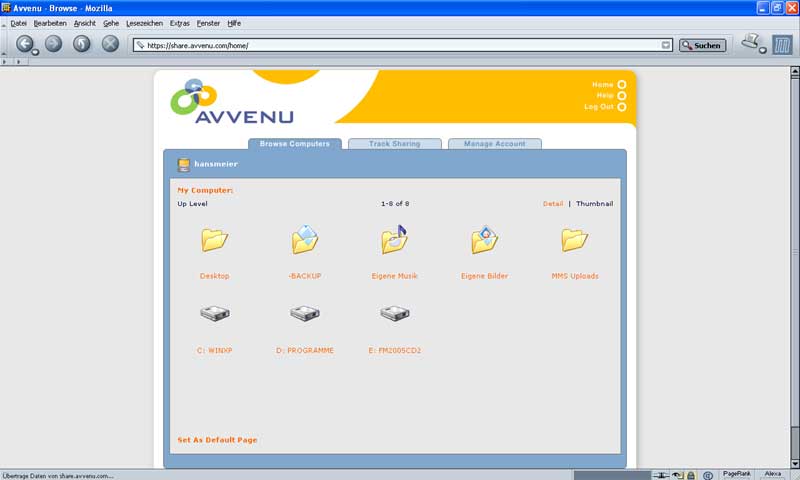
Avvenu was mentioned recently in an article in PC Magazine about smartphones. Being the recent recipient of a Verizon XV-6700, I was interested. It isn't for just Pocket PC's though, it works on desktop computers too.
Avvenu installs as a service on your PC and allows you to log in to a web based interface from any other computer and browse your shared files. It shows photos as thumbs automatically and streams your audio files to the media player of your choice. You can also make folders and files available to someone else with an emailed link that expires at a pre-chosen interval. You could host your own photos to friends and family, stream some music to yourself or someone else, and get instant access to forgotten files from any PC or handheld when you cant get to your own computer.
I am still discovering uses for both of these services everyday, and would be able to ramble on for hours about them. I will spare you though.....
Wednesday, June 07, 2006
OpenOffice.org
Microsoft owns the office suite market. No arguing that these days. Lotus has fallen into obscurity, still used religiously by a small group of loyal accountants, and Corel sells very little of its Word Perfect, and Quattro Pro offerings compared to Word, and Excel.
Corporations have recently been the target of license auditing by Microsoft, receiving letters that they are in violation of their licensing agreements if they have gone beyond the number of licenses they purchased. I am not condoning pirating of these applications, but Microsoft's scare tactics have many people heading in a new direction.
When I first saw the predecessor to OpenOffice, it had come with a copy of Caldera Linux, and was called Star Office. It was clunky and bloated, but got the job done, as this was long before there was any other Linux office suite that worked at all. The windows version was available free for personal use, and was scary enough to avoid. Then Sun purchased Star, and made a parallel open-source offering called OpenOffice.
The newest version is impressive. Impressive enough that more and more people, including corporate users, have been using it in place of Microsoft Office. The transition is not perfect since OpenOffice is not an exact clone of MS Office, there is a small learning curve, but all functionality is there. There are even a few things that it does better. It comes with equivalents for Word, Excell, Power Point, and Access. The only thing missing is an Outlook clone, and for those people running newer versions of Exchange, Outlook Web Access is usually enough these days.
Give it a try! Available for Windows, Linux, Solaris, FreeBSD, and MacOS.
Click Here to Download OpenOffice.org
Corporations have recently been the target of license auditing by Microsoft, receiving letters that they are in violation of their licensing agreements if they have gone beyond the number of licenses they purchased. I am not condoning pirating of these applications, but Microsoft's scare tactics have many people heading in a new direction.
When I first saw the predecessor to OpenOffice, it had come with a copy of Caldera Linux, and was called Star Office. It was clunky and bloated, but got the job done, as this was long before there was any other Linux office suite that worked at all. The windows version was available free for personal use, and was scary enough to avoid. Then Sun purchased Star, and made a parallel open-source offering called OpenOffice.
The newest version is impressive. Impressive enough that more and more people, including corporate users, have been using it in place of Microsoft Office. The transition is not perfect since OpenOffice is not an exact clone of MS Office, there is a small learning curve, but all functionality is there. There are even a few things that it does better. It comes with equivalents for Word, Excell, Power Point, and Access. The only thing missing is an Outlook clone, and for those people running newer versions of Exchange, Outlook Web Access is usually enough these days.
Give it a try! Available for Windows, Linux, Solaris, FreeBSD, and MacOS.
Click Here to Download OpenOffice.org
Wednesday, May 31, 2006
Log Me In
Those of us that move around a lot, deal with multiple computers, or support friends, family members, or even clients, use remote-control software. PCAnywhere was always the solution years ago, with a few other contenders (Carbon Copy, LapLink, etc..). For network use there is always VNC, and RDP, but they have their limitations, mostly if you have to traverse a firewall.
A number of years ago, GoToMyPC.com came on the scene. Using a web-based solution they were able to provide good remote control, through almost any kind of security layer. The problem is, it tends to get pricey if you need to support multiple hosts. Enter LogMeIn.
LogMeIn offers a freeware version with no host limit. You can access all of your computers from anywhere. It runs in IE, or Firefox, and even provides an HTML-only solution for non-compliant browsers. You can adjust the settings for slower networks, and the screen scaling is excellent. There is even a good PocketPC client for handhelds and smartphones.
The registered version offers file transfer and printing. I have an ftp server and an internet based printer, so I do fine without. You can also use a PDF creator like this one from Sector7G and email the results to yourself. There is an enhanced version called IT Reach that is great for IT departments, and a no-install help tool called Rescue, that allows full remote control, but never installs, and disappears completely when finished.
Check out all of these tools at http://www.logmein.com
A number of years ago, GoToMyPC.com came on the scene. Using a web-based solution they were able to provide good remote control, through almost any kind of security layer. The problem is, it tends to get pricey if you need to support multiple hosts. Enter LogMeIn.
LogMeIn offers a freeware version with no host limit. You can access all of your computers from anywhere. It runs in IE, or Firefox, and even provides an HTML-only solution for non-compliant browsers. You can adjust the settings for slower networks, and the screen scaling is excellent. There is even a good PocketPC client for handhelds and smartphones.
The registered version offers file transfer and printing. I have an ftp server and an internet based printer, so I do fine without. You can also use a PDF creator like this one from Sector7G and email the results to yourself. There is an enhanced version called IT Reach that is great for IT departments, and a no-install help tool called Rescue, that allows full remote control, but never installs, and disappears completely when finished.
Check out all of these tools at http://www.logmein.com
Welcome
Welcome to my Freeware page. I will try to post 2-3 programs per-week, utilities, or services here that I have found that are free, or near free. Feel free to respond with your comments and recommendations.
Subscribe to:
Posts (Atom)